Most small business owners don’t wake up thinking about accounting software. They usually end up comparing Xero and QuickBooks after something starts getting harder than it should be.
Invoices get missed. Bank reconciliation takes too long. The accountant keeps asking for cleaner records. Or the business has grown to the point where spreadsheets simply stop working.
That’s usually when the Xero vs QuickBooks for Small Businesses decision appears.
And the truth is most people are not choosing between good and bad software. They’re choosing between two capable systems that start to feel quite different once real people are using them every week.
Neither fixes poor bookkeeping on its own. The right choice depends on how your business actually works.
The decision usually starts with a hidden cost problem, not a software problem
Most people think they are comparing monthly subscriptions.
They’re not.
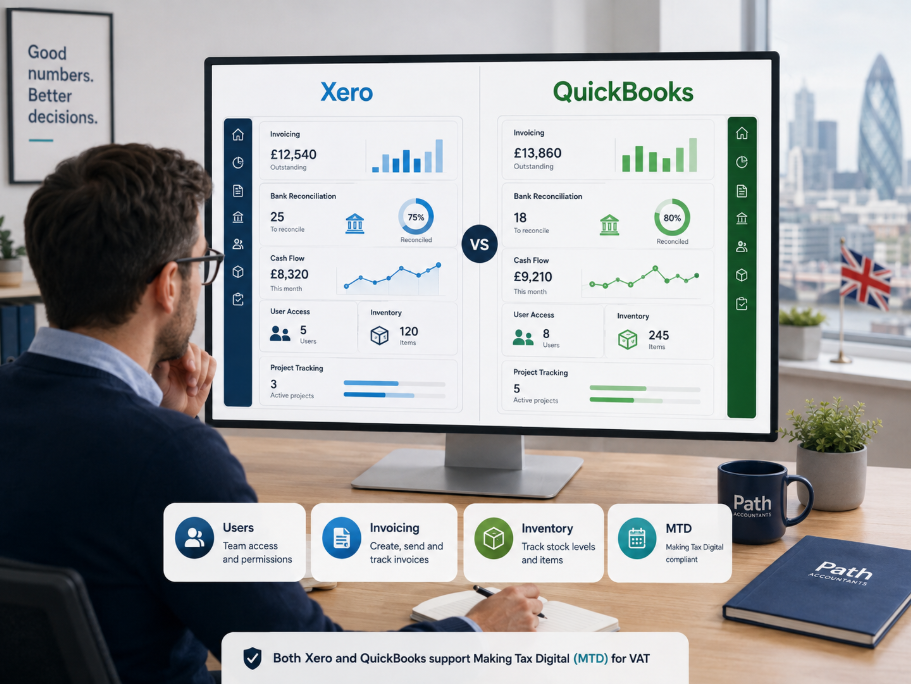
They’re really trying to avoid paying for something they didn’t realise they would need later another user, payroll, expenses, project tools or a higher plan. Xero says its main subscriptions have no per-user licence fees, although some features such as Expenses, Projects and Payroll have their own included usage limits and additional charges. You can see the current details on Xero’s UK pricing page.
QuickBooks approaches access differently. Its current UK plans allow:
- Simple Start: one standard user, plus accountant access;
- Essentials: three users, plus accountant access;
- Plus: five users, plus accountant access;
- Advanced: up to 25 users, plus accountant access.
You can check the latest plans directly on the QuickBooks UK pricing page.
That difference sounds small until a director, bookkeeper, admin employee and finance person all need their own access.
So the useful question in a Xero vs QuickBooks for Small Businesses comparison is not simply, “Which subscription is cheaper today?”
It is:
How many people are realistically going to need the accounts in the next 6–12 months?
Promotional prices change regularly. Team structure normally matters for much longer.
If software costs are only one part of a wider finance problem, our guide to bookkeeping costs for small businesses explains what businesses are actually paying for beyond the software subscription.
Why some businesses find Xero easier and others barely notice a difference
People often describe Xero as simpler, but that doesn’t necessarily mean QuickBooks is difficult.
What they normally mean is that Xero keeps common bookkeeping jobs fairly direct.
You connect your bank, work through transactions, match what you can and keep moving.
QuickBooks puts more information and tools around the same workflow. Some owners like that because they can see more without moving between areas. Others find it busier than they need.
Neither approach is automatically better.
Think about an ordinary Friday afternoon.
There are transactions waiting to be reconciled, two customers haven’t paid and you want to see whether this month was actually profitable. The software that gets you through those jobs without making you think too much is probably the better fit.
That matters because complicated software gets ignored.
And ignored bookkeeping eventually becomes expensive bookkeeping.
If you’re still deciding whether software alone is enough, our guide to small business accounting explains where bookkeeping software ends and proper accounting support begins.
Where Xero quietly wins: when more people start touching the accounts
A business that starts with one owner rarely stays that simple.
Later there may be:
- a bookkeeper posting transactions and checking bank feeds;
- an administrator raising invoices;
- a director reviewing reports;
- an external accountant checking VAT or year-end figures.
This is where Xero’s no-per-user licence structure becomes much more noticeable.
You’re less likely to redesign an ordinary bookkeeping process just because another person needs access to the core accounting system.
That can work particularly well for agencies, consultancies, growing limited companies and businesses using outsourced finance support.
QuickBooks can support teams as well its higher plans currently move from three to five and eventually 25 users.
The difference is that user numbers play a bigger part in deciding which QuickBooks plan you need.
So for a growing company, Xero vs QuickBooks for Small Businesses can become a seat-cost decision before it becomes a feature decision.
QuickBooks starts looking stronger when stock becomes part of everyday life
The comparison changes when you sell products rather than time.
Now you aren’t only tracking money. You are dealing with products coming in, products going out, supplier orders, returns and the cost attached to what you sell.
QuickBooks Plus currently includes inventory management, including product tracking, cost of goods and purchase orders. It also includes project profitability tracking.
That makes it attractive if you want more of those jobs handled inside one platform.
Xero can still work very well for e-commerce. Plenty of businesses use their accounting platform alongside Shopify, Amazon, payment providers and specialist inventory software.
And once stock becomes genuinely complicated, that wider setup often matters more than which accounting logo sits in the middle of it.
The better question is:
Do you want inventory managed mainly inside your accounting software, or through a specialist system connected to it?
For a small online shop, QuickBooks’ built-in inventory may be enough. For a larger operation with several channels or fulfilment systems, integrations can become more important than built-in stock features.
Service businesses have a different headache altogether
An agency, consultant or freelancer usually doesn’t care about purchase orders for stock.
They care about whether invoices went out, whether clients paid and whether projects are actually making money.
The everyday priorities are more likely to be:
- raising invoices without wasting time;
- keeping bank transactions clean;
- seeing unpaid customer balances;
- giving the accountant easy access;
- understanding whether the business is making enough money.
This is where Xero can feel particularly natural because the core bookkeeping workflow stays fairly focused.
QuickBooks deserves a serious look where project tracking is important. Its Plus plan includes project profitability, while Essentials includes employee time tracking.
For a freelancer or consultancy weighing up the options, our accounting software guide for sole traders looks at the decision from a wider UK perspective.
So the service-business version of Xero vs QuickBooks for Small Businesses is really about what you want the system to do beyond the books.
Sole traders don’t need more features they need fewer mistakes
A sole trader can easily end up paying for features they never use.
Most simply need a reliable way to:
- send invoices;
- record expenses;
- keep digital records;
- understand what is coming in and going out;
- give their accountant access when needed.
Making Tax Digital now makes that choice more important for some UK sole traders and landlords.
HMRC says people with qualifying self-employment and property income above £50,000 for the 2024/25 tax year should have started using Making Tax Digital for Income Tax from 6 April 2026. The threshold moves to more than £30,000 from April 2027 and more than £20,000 from April 2028. HMRC explains the current thresholds here.
Both platforms offer MTD-ready options, so “MTD compatible” alone shouldn’t decide the winner.
If you’re affected and still unclear about what actually changes, read our plain-English guide to Making Tax Digital or our guide to bookkeeping for sole traders.
For sole traders, the best software is normally the one that keeps the records accurate without turning bookkeeping into another weekly chore.
AI can save admin time but it still doesn’t understand every transaction
This part of the Xero vs QuickBooks for Small Businesses comparison is changing quickly.
Xero is developing its AI finance tools around JAX, which can help with work such as document capture, invoicing and reconciliation. Xero explains JAX and its accounting AI here.
QuickBooks now uses Intuit Intelligence and related AI features for tasks including transaction categorisation, finding possible errors and answering questions from business data. QuickBooks explains its current AI tools here.
Useful? Definitely.
Something I would trust blindly with every accounting decision? No.
A £500 payment could be equipment, stock, a deposit, a personal purchase or something else altogether. Software can recognise patterns, but context still matters.
AI should reduce repetitive admin. Your records still need proper oversight.
Switching software is usually easier than cleaning what you’re moving
Businesses often stay with software they dislike because moving years of accounts sounds dangerous.
The software transfer is only part of the problem.
Before migrating, you want confidence in:
- bank reconciliations;
- outstanding customer invoices;
- supplier balances;
- VAT records;
- opening figures;
- your chart of accounts.
If those numbers are already wrong, importing them beautifully into a new platform simply gives you the same problem in a nicer dashboard.
That is why a migration is a good moment to review the books rather than copying everything without checking it.
If you’re unsure how clean the existing records are, Path’s bookkeeping health check is a more sensible starting point than immediately cancelling your software subscription.
Before you switch platforms, let Path Accountants look at what’s actually going wrong
Sometimes the business genuinely has the wrong software. Other times, the software is fine and the setup is the problem.
At Path Accountants, we can look at how your finance process actually works who raises invoices, who needs access, how VAT is handled, whether payroll is involved, what other systems feed into the accounts and whether the current bookkeeping is clean enough to migrate.
From there, the answer might be:
- keep the existing platform and clean it up;
- restructure the chart of accounts;
- move from QuickBooks to Xero;
- move from Xero to QuickBooks;
- fix bank feeds and opening balances;
- improve VAT and MTD processes;
- hand the monthly bookkeeping over completely.
For businesses that would rather have an external finance team manage more of the process, see our outsourced accounting service. And if you simply want someone to look at your current setup before you spend more money changing it, book a free consultation with Path Accountants.
Sometimes switching saves money.
Sometimes staying put saves even more.
The useful part is knowing which situation you are actually in.
So what actually makes sense?
There is no universal winner in Xero vs QuickBooks for Small Businesses.
But there are useful patterns.
Xero will often make more sense when:
- several people need access to the core accounts;
- you prefer a focused day-to-day bookkeeping workflow;
- your business relies heavily on connected apps;
- you expect more people to become involved in finance as you grow.
QuickBooks will often make more sense when:
- inventory is important to everyday operations;
- you want project profitability inside the accounting platform;
- your user requirements comfortably fit the plan you need;
- you prefer having more business functions inside one system.
And that leads to the part that matters most:
The best accounting software is the one that matches how your business already operates and that your team will actually keep up to date.
FAQs
Is Xero or QuickBooks better for small businesses in the UK?
Neither is better for every business. Xero is particularly attractive where several people need access and straightforward bookkeeping matters. QuickBooks becomes compelling where inventory, project profitability or more built-in tools are important.
Does Xero charge for each user like QuickBooks?
Xero says its core subscriptions have no per-user licence fees. However, some features including Expenses and Projects have included-user allowances and can attract extra charges when those limits are exceeded. QuickBooks limits standard users according to the plan.
Can I switch from QuickBooks to Xero without losing my records?
Yes, data can be moved between accounting systems, but the important part is validating what has moved. Bank balances, unpaid invoices, supplier balances, VAT figures and opening balances should agree with the old records after migration.
Which is better for an e-commerce business?
QuickBooks Plus currently includes built-in inventory management. Xero can also suit e-commerce businesses that prefer to connect their accounting with specialist stock, marketplace and payment systems.
Are Xero and QuickBooks suitable for Making Tax Digital?
Both provide UK MTD-ready options. Which MTD rules apply to you depends on your circumstances and qualifying income, so software choice should be made alongside the actual HMRC requirements.
Do accountants prefer Xero or QuickBooks?
Most accounting firms can work with both. The more important issue is whether the software fits the business and whether the records inside it are complete, accurate and kept up to date.