
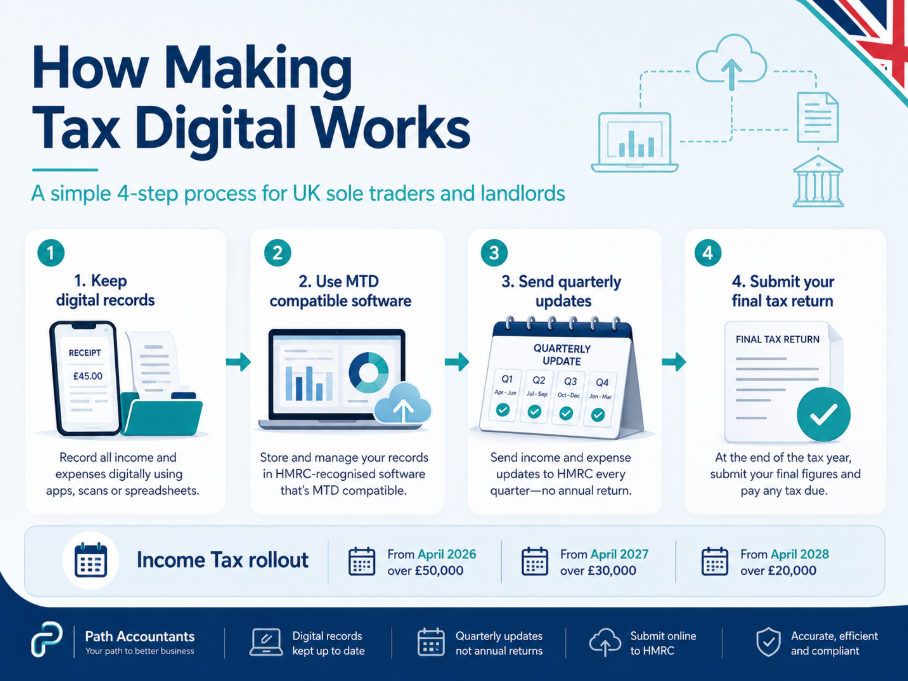
Making Tax Digital (MTD) is a HMRC’s system for keeping tax records digitally and sending tax updates through compatible software. For Income Tax, it affects sole traders and landlords with qualifying income over £50,000 from April 2026, over £30,000 from April 2027, and over £20,000 from April 2028.
In simple words, Making Tax Digital means tax will no longer be something you only sort once a year. If MTD applies to you, you will usually keep digital records, send four quarterly updates, and submit one final tax return.
What actually changes under Making Tax Digital?
The biggest change is the routine. Instead of collecting receipts, bank statements, rent records, and invoices near the Self Assessment tax return deadline, you need to keep your records updated during the year.
Main changes include:
- You need to keep income and expense records digitally instead of relying only on paper records or last minute spreadsheets.
- You need software that works with HMRC, either full accounting software or spreadsheets connected through bridging software.
- You usually send four quarterly updates during the year, but these are not your final tax return.
- You still submit a final tax return after the tax year ends to confirm the full tax position.
- You do not automatically pay Income Tax four times a year because quarterly updates are reporting updates, not quarterly tax bills.
This is why what is Making Tax Digital is not just a software question. It changes how regularly you organise your records.
Who needs to use Making Tax Digital?
Making Tax Digital already applies to VAT registered businesses. HMRC says VAT registered businesses must use compatible software to keep VAT records and file VAT returns. For Income Tax, the rules mainly apply to sole traders and landlords with self employment income, property income, or both.
| Start date | Who needs to use MTD for Income Tax |
|---|---|
| 6 April 2026 | Sole traders and landlords with qualifying income over £50,000 |
| 6 April 2027 | Sole traders and landlords with qualifying income over £30,000 |
| 6 April 2028 | Sole traders and landlords with qualifying income over £20,000 |
If you are VAT registered, also check Path’s guides on VAT and the VAT threshold.
What counts as qualifying income?
Qualifying income usually means your gross income before expenses. This is where many people get confused because they check profit instead of total income.
For example, if you receive £28,000 in rental income and £25,000 from self employment, your qualifying income is £53,000. Even if your profit is much lower after costs, you may still fall into Making Tax Digital.
Check these situations carefully:
- If you are a sole trader, check your turnover before expenses such as fuel, software, phone costs, stock, or subcontractors.
- If you are a landlord, check rental income before repairs, letting agent fees, insurance, mortgage interest, or service charges.
- If you have both self employment and rental income, add both together when checking the threshold.
- If you jointly own a rental property, you normally count your own share of the rental income.
This is one of the most important parts of what is Making Tax Digital, because being under the threshold by profit does not always mean you are under it by gross income.
Making Tax Digital deadlines
The first Income Tax group starts on 6 April 2026. HMRC lists the standard quarterly update deadlines as 7 August, 7 November, 7 February, and 7 May.
| Date | What happens |
|---|---|
| 6 April 2026 | Start keeping digital records if MTD applies |
| 7 August 2026 | First quarterly update deadline |
| 7 November 2026 | Second quarterly update deadline |
| 7 February 2027 | Third quarterly update deadline |
| 7 May 2027 | Fourth quarterly update deadline |
| 31 January 2028 | Final MTD tax return and tax payment deadline for 2026 to 2027 |
You can also read Path’s guide on the tax return deadline for wider Self Assessment dates.
What records and software do you need?
You need digital records for the income and expenses covered by Making Tax Digital. For sole traders, this may include sales, invoices, purchases, travel, software, phone costs, equipment, and bank charges. For landlords, it may include rent, repairs, letting agent fees, insurance, service charges, and property finance costs.
The record should explain the transaction clearly. “£500 expense” is weak. “£500 boiler repair for rental property, paid on 12 May, invoice saved” is much better.
You also need software that works with Making Tax Digital. HMRC says compatible software should support digital records and quarterly updates.
Your options usually include:
- Full accounting software if you want bank feeds, reports, categories, quarterly updates, and accountant access in one place.
- Spreadsheets with bridging software if your spreadsheet records are clean and can be sent to HMRC correctly.
- Existing bookkeeping software, but only if it supports the right MTD service for your income type.
If you are choosing software, Path’s guide on the best accounting software for sole traders is a useful next read.
Can you still use spreadsheets?
Yes, but spreadsheets must fit the MTD process. A spreadsheet alone may not be enough if it cannot connect to HMRC through compatible or bridging software.
Spreadsheets can work if you update them regularly, keep clear entries, save receipts, and avoid mixing personal and business costs. They become risky when you only update them once a year.
The real question is not only “Can I use spreadsheets?” It is whether your spreadsheet is strong enough for quarterly reporting.
Does Making Tax Digital mean paying tax four times a year?
No. Quarterly updates do not mean quarterly Income Tax payments. The updates show income and expenses during the year. Your final payment deadline remains linked to the final tax return. For the first MTD Income Tax year, the final return and payment deadline is 31 January 2028.
MTD can still help with cash flow because updated records give you a clearer view of your likely tax bill. You can also use Path’s UK income tax calculator or self employed calculator.
What happens if you miss a deadline?
HMRC has said there will be no penalties for missing quarterly update deadlines in the 2026 to 2027 tax year, but you still need to keep digital records and send the updates before submitting your final return. Penalties can still apply for late tax returns, late payments, and poor records. The first year may be more forgiving, but it is still better to build the right habit from the start.
To reduce problems:
- Review your records monthly instead of waiting for the quarterly deadline.
- Check missing receipts, invoices, and bank payments before each update.
- Speak to your accountant early if software figures do not look right.
How MTD affects landlords and sole traders
Landlords need to watch their rental income carefully because property income counts towards the MTD threshold. This matters if you have more than one property, jointly owned property, letting agent deductions, repairs, service charges, or finance costs.
Path’s guide on tax and rental income may also help.
Sole traders need a cleaner system for income and expenses. Payments may come through bank transfer, cash, card machines, Stripe, PayPal, or invoices. Costs may be paid from different cards or accounts. Under MTD, that loose system becomes harder to manage.
A simple monthly routine helps:
- Check bank transactions so missing income or expenses are spotted early.
- Save receipts digitally when you pay for business costs.
- Review invoices and payment platforms so sales are not missed.
- Keep personal spending away from business records where possible.
For better record keeping, read Path’s guides on bookkeeping for sole traders and small business bookkeeping.
How Path Accountants can help with Making Tax Digital
If you are still unsure what is Making Tax Digital means for your business or rental income, Path Accountants can help you understand what applies to you. MTD can feel confusing because it brings several things together: thresholds, gross income, software, digital records, quarterly updates, and final tax returns.
Path Accountants can help you check whether your self employment income, property income, or combined income brings you into MTD. We can also review your current records, check whether spreadsheets are suitable, help you choose software, and prepare your bookkeeping before quarterly updates begin.
For support, book an MTD consultation or speak to Path through the free consultation page.
Final thoughts
So, what is Making Tax Digital in real life It is HMRC’s move towards digital records and regular online reporting. If your qualifying income is above the threshold, you need to prepare early. Check your income, clean up your records, choose suitable software, and get advice before the first quarterly update is due. With the right setup, Making Tax Digital can give you cleaner records, fewer tax surprises, and better control over your business or property income.
FAQs
What is Making Tax Digital?
MTD means keeping tax records digitally and sending tax information to HMRC through compatible software.
Does Making Tax Digital replace Self Assessment?
Not fully. It changes how income and expenses are reported during the year, but a final tax return is still needed.
Do quarterly updates mean quarterly tax payments?
No. Quarterly updates are reporting updates, not quarterly tax bills.
Can landlords use spreadsheets for Making Tax Digital?
Yes, but the spreadsheet may need bridging software so it can send information to HMRC properly.
Do I need an accountant for MTD?
You do not legally need one, but an accountant can help with software, records, quarterly updates, tax return checks, and planning.

